

Yi: Open Foundation Models by 01.AI
Paper • 2403.04652 • Published • 65
This repo contains State Of The Art quantized GGUF format model files for Yi-Coder-9B-Chat.
Quantization was done with an importance matrix that was trained for ~1M tokens (256 batches of 4096 tokens) of answers from the CodeFeedback-Filtered-Instruction dataset.
Update September 19th: Requantized with new imatrix after finding a bug in llama-imatrix that degraded the data set. Also removed the Fill-in-Middle tokens as they are not properly supported.
Update September 5th: Marked <|im_start|> as a special token, fixing tokenization.
Corrected EOS (<|im_end|>) and added EOT (<|endoftext|>) token to prevent infinite responses (am I the only one actually dog-fooding my own quants?).
<|im_start|>system
{system_prompt}<|im_end|>
<|im_start|>user
{prompt}<|im_end|>
<|im_start|>assistant
These quantised GGUFv3 files are compatible with llama.cpp from February 27th 2024 onwards, as of commit 0becb22
They are also compatible with many third party UIs and libraries provided they are built using a recent llama.cpp.
The new methods available are:
Refer to the Provided Files table below to see what files use which methods, and how.
| Name | Quant method | Bits | Size | Max RAM required | Use case |
|---|---|---|---|---|---|
| Yi-Coder-9B-Chat.IQ1_S.gguf | IQ1_S | 1 | 1.9 GB | 2.2 GB | smallest, significant quality loss |
| Yi-Coder-9B-Chat.IQ1_M.gguf | IQ1_M | 1 | 2.0 GB | 2.3 GB | very small, significant quality loss |
| Yi-Coder-9B-Chat.IQ2_XXS.gguf | IQ2_XXS | 2 | 2.3 GB | 2.6 GB | very small, high quality loss |
| Yi-Coder-9B-Chat.IQ2_XS.gguf | IQ2_XS | 2 | 2.5 GB | 2.8 GB | very small, high quality loss |
| Yi-Coder-9B-Chat.IQ2_S.gguf | IQ2_S | 2 | 2.7 GB | 2.9 GB | small, substantial quality loss |
| Yi-Coder-9B-Chat.IQ2_M.gguf | IQ2_M | 2 | 2.9 GB | 3.1 GB | small, greater quality loss |
| Yi-Coder-9B-Chat.IQ3_XXS.gguf | IQ3_XXS | 3 | 3.2 GB | 3.5 GB | very small, high quality loss |
| Yi-Coder-9B-Chat.IQ3_XS.gguf | IQ3_XS | 3 | 3.5 GB | 3.8 GB | small, substantial quality loss |
| Yi-Coder-9B-Chat.IQ3_S.gguf | IQ3_S | 3 | 3.6 GB | 3.9 GB | small, greater quality loss |
| Yi-Coder-9B-Chat.IQ3_M.gguf | IQ3_M | 3 | 3.8 GB | 4.1 GB | medium, balanced quality - recommended |
| Yi-Coder-9B-Chat.IQ4_XS.gguf | IQ4_XS | 4 | 4.5 GB | 4.7 GB | small, substantial quality loss |
Generated importance matrix file: Yi-Coder-9B-Chat.imatrix.dat
Note: the above RAM figures assume no GPU offloading with 4K context. If layers are offloaded to the GPU, this will reduce RAM usage and use VRAM instead.
llama.cpp command
Make sure you are using llama.cpp from commit 0becb22 or later.
./llama-cli -ngl 49 -m Yi-Coder-9B-Chat.IQ4_XS.gguf --color -c 131072 --temp 0 --repeat-penalty 1.1 -p "<|im_start|>system\nYou are a helpful assistant.<|im_end|>\n<|im_start|>\n{prompt}<|im_end|>\n<|im_start|>assistant\n"
Change -ngl 49 to the number of layers to offload to GPU. Remove it if you don't have GPU acceleration.
Change -c 131072 to the desired sequence length.
If you are low on V/RAM try quantizing the K-cache with -ctk q8_0 or even -ctk q4_0 for big memory savings (depending on context size).
There is a similar option for V-cache (-ctv), only available if you enable Flash Attention (-fa) as well.
For other parameters and how to use them, please refer to the llama.cpp documentation
You can use GGUF models from Python using the llama-cpp-python module.
For full documentation, please see: llama-cpp-python docs.
Run one of the following commands, according to your system:
# Prebuilt wheel with basic CPU support
pip install llama-cpp-python --extra-index-url https://abetlen.github.io/llama-cpp-python/whl/cpu
# Prebuilt wheel with NVidia CUDA acceleration
pip install llama-cpp-python --extra-index-url https://abetlen.github.io/llama-cpp-python/whl/cu121 (or cu122 etc.)
# Prebuilt wheel with Metal GPU acceleration
pip install llama-cpp-python --extra-index-url https://abetlen.github.io/llama-cpp-python/whl/metal
# Build base version with no GPU acceleration
pip install llama-cpp-python
# With NVidia CUDA acceleration
CMAKE_ARGS="-DGGML_CUDA=on" pip install llama-cpp-python
# Or with OpenBLAS acceleration
CMAKE_ARGS="-DGGML_BLAS=ON -DGGML_BLAS_VENDOR=OpenBLAS" pip install llama-cpp-python
# Or with AMD ROCm GPU acceleration (Linux only)
CMAKE_ARGS="-DGGML_HIPBLAS=on" pip install llama-cpp-python
# Or with Metal GPU acceleration for macOS systems only
CMAKE_ARGS="-DGGML_METAL=on" pip install llama-cpp-python
# Or with Vulkan acceleration
CMAKE_ARGS="-DGGML_VULKAN=on" pip install llama-cpp-python
# Or with SYCL acceleration
CMAKE_ARGS="-DGGML_SYCL=on -DCMAKE_C_COMPILER=icx -DCMAKE_CXX_COMPILER=icpx" pip install llama-cpp-python

# In windows, to set the variables CMAKE_ARGS in PowerShell, follow this format; eg for NVidia CUDA:
$env:CMAKE_ARGS = "-DGGML_CUDA=on"
pip install llama-cpp-python
from llama_cpp import Llama

# Chat Completion API

llm = Llama(model_path="./Yi-Coder-9B-Chat.IQ4_XS.gguf", n_gpu_layers=49, n_ctx=131072)
print(llm.create_chat_completion(
    repeat_penalty = 1.1,
    messages = [
        {
            "role": "user",
            "content": "Pick a LeetCode challenge and solve it in Python."
        }
    ]
))

🐙 GitHub •
👾 Discord •
🐤 Twitter •
💬 WeChat
📝 Paper •
💪 Tech Blog •
🙌 FAQ •
📗 Learning Hub
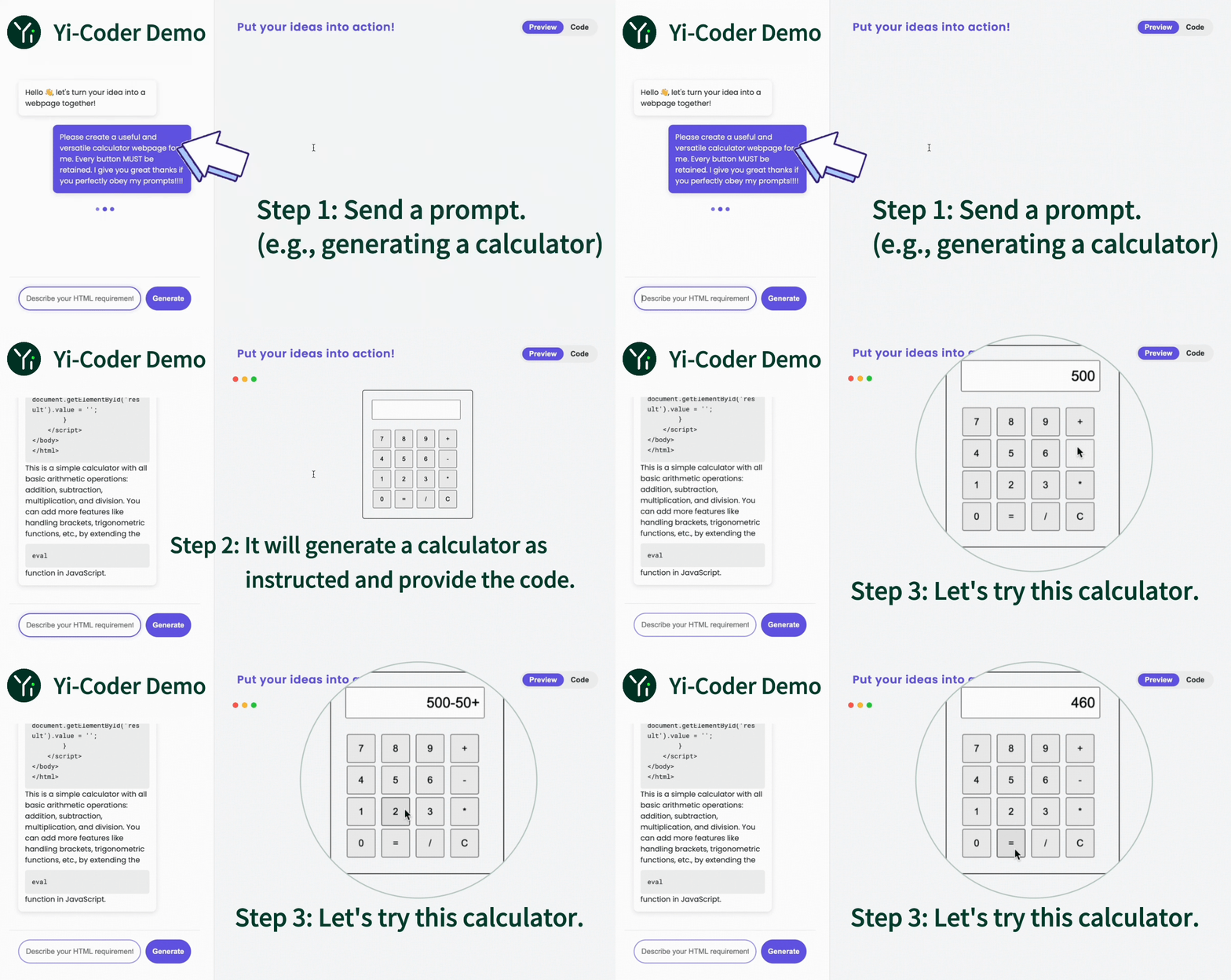
Yi-Coder is a series of open-source code language models that delivers state-of-the-art coding performance with fewer than 10 billion parameters.
Key features:
'java', 'markdown', 'python', 'php', 'javascript', 'c++', 'c#', 'c', 'typescript', 'html', 'go', 'java_server_pages', 'dart', 'objective-c', 'kotlin', 'tex', 'swift', 'ruby', 'sql', 'rust', 'css', 'yaml', 'matlab', 'lua', 'json', 'shell', 'visual_basic', 'scala', 'rmarkdown', 'pascal', 'fortran', 'haskell', 'assembly', 'perl', 'julia', 'cmake', 'groovy', 'ocaml', 'powershell', 'elixir', 'clojure', 'makefile', 'coffeescript', 'erlang', 'lisp', 'toml', 'batchfile', 'cobol', 'dockerfile', 'r', 'prolog', 'verilog'
For model details and benchmarks, see Yi-Coder blog and Yi-Coder README.
| Name | Type | Length | Download |
|---|---|---|---|
| Yi-Coder-9B-Chat | Chat | 128K | 🤗 Hugging Face • 🤖 ModelScope • 🟣 wisemodel |
| Yi-Coder-1.5B-Chat | Chat | 128K | 🤗 Hugging Face • 🤖 ModelScope • 🟣 wisemodel |
| Yi-Coder-9B | Base | 128K | 🤗 Hugging Face • 🤖 ModelScope • 🟣 wisemodel |
| Yi-Coder-1.5B | Base | 128K | 🤗 Hugging Face • 🤖 ModelScope • 🟣 wisemodel |
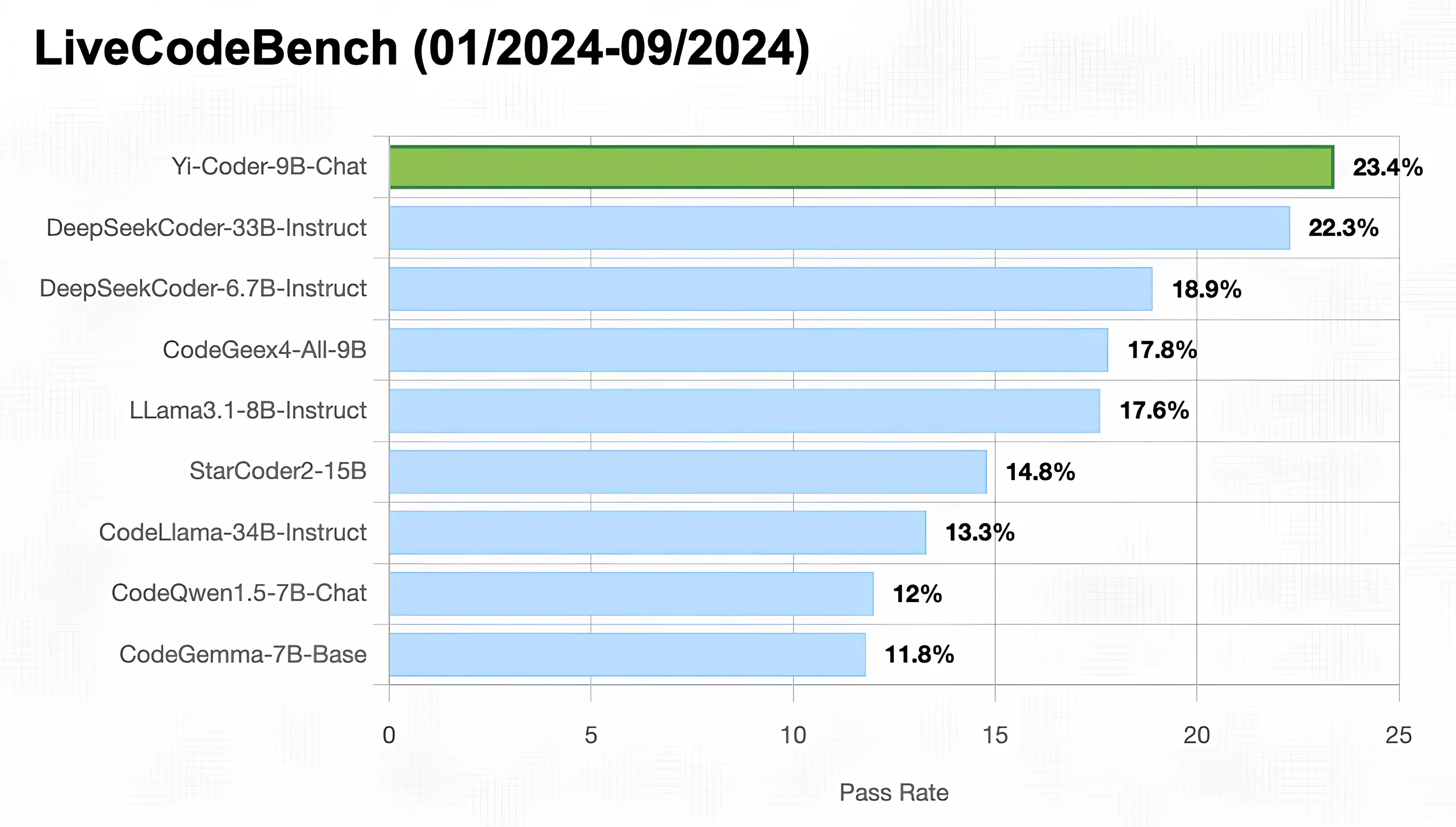
As illustrated in the figure below, Yi-Coder-9B-Chat achieved an impressive 23% pass rate in LiveCodeBench, making it the only model with under 10B parameters to surpass 20%. It also outperforms DeepSeekCoder-33B-Ins at 22.3%, CodeGeex4-9B-all at 17.8%, CodeLLama-34B-Ins at 13.3%, and CodeQwen1.5-7B-Chat at 12%.
You can use transformers to run inference with Yi-Coder models (both chat and base versions) as follows:
from transformers import AutoTokenizer, AutoModelForCausalLM

device = "cuda" # the device to load the model onto
model_path = "01-ai/Yi-Coder-9B-Chat"

tokenizer = AutoTokenizer.from_pretrained(model_path)
model = AutoModelForCausalLM.from_pretrained(model_path, device_map="auto").eval()

prompt = "Write a quick sort algorithm."
messages = [
    {"role": "system", "content": "You are a helpful assistant."},
    {"role": "user", "content": prompt}
]
text = tokenizer.apply_chat_template(
    messages,
    tokenize=False,
    add_generation_prompt=True
)
model_inputs = tokenizer([text], return_tensors="pt").to(device)

generated_ids = model.generate(
    model_inputs.input_ids,
    max_new_tokens=1024,
    eos_token_id=tokenizer.eos_token_id
)
generated_ids = [
    output_ids[len(input_ids):] for input_ids, output_ids in zip(model_inputs.input_ids, generated_ids)
]

response = tokenizer.batch_decode(generated_ids, skip_special_tokens=True)[0]
print(response)
For getting up and running with Yi-Coder series models quickly, see Yi-Coder README.
1-bit
2-bit
3-bit
4-bit
16-bit