

Quantized 4-bit models
Collection
Large model quantized with post-quantization performance very close to the original models, allowing it to run on reasonable infrastructure. • 9 items • Updated • 1
Converted version of CodeLlama-7b to 4-bit using bitsandbytes. For more information about the model, refer to the model's page.
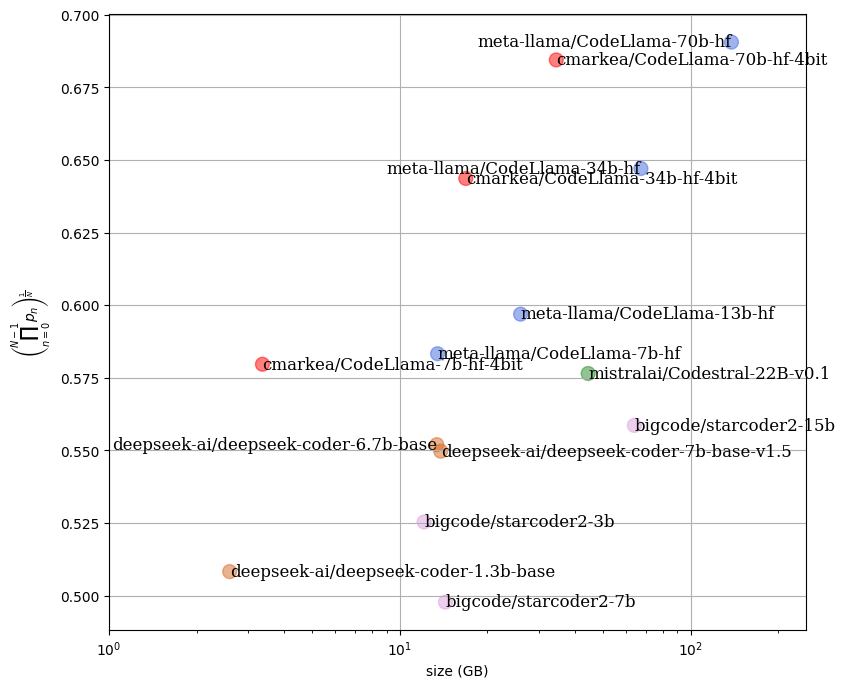
In the following figure, we can see the impact on the performance of a set of models relative to the required RAM space. It is noticeable that the quantized models have equivalent performance while providing a significant gain in RAM usage.
Install from pip and serve model
# Install vLLM from pip: pip install vllm# Start the vLLM server: vllm serve "cmarkea/CodeLlama-7b-hf-4bit"# Call the server using curl (OpenAI-compatible API): curl -X POST "http://localhost:8000/v1/completions" \ -H "Content-Type: application/json" \ --data '{ "model": "cmarkea/CodeLlama-7b-hf-4bit", "prompt": "Once upon a time,", "max_tokens": 512, "temperature": 0.5 }'