Instructions to use unsloth/GLM-4.6-GGUF with libraries, inference providers, notebooks, and local apps. Follow these links to get started.
- Libraries
- Transformers
How to use unsloth/GLM-4.6-GGUF with Transformers:
# Use a pipeline as a high-level helper from transformers import pipeline pipe = pipeline("text-generation", model="unsloth/GLM-4.6-GGUF") messages = [ {"role": "user", "content": "Who are you?"}, ] pipe(messages)# Load model directly from transformers import AutoModel model = AutoModel.from_pretrained("unsloth/GLM-4.6-GGUF", dtype="auto") - llama-cpp-python
How to use unsloth/GLM-4.6-GGUF with llama-cpp-python:
# !pip install llama-cpp-python from llama_cpp import Llama llm = Llama.from_pretrained( repo_id="unsloth/GLM-4.6-GGUF", filename="BF16/GLM-4.6-BF16-00001-of-00015.gguf", )
llm.create_chat_completion( messages = [ { "role": "user", "content": "What is the capital of France?" } ] ) - Notebooks
- Google Colab
- Kaggle
- Local Apps
- llama.cpp
How to use unsloth/GLM-4.6-GGUF with llama.cpp:
Install from brew
brew install llama.cpp # Start a local OpenAI-compatible server with a web UI: llama-server -hf unsloth/GLM-4.6-GGUF:UD-Q4_K_XL # Run inference directly in the terminal: llama-cli -hf unsloth/GLM-4.6-GGUF:UD-Q4_K_XL
Install from WinGet (Windows)
winget install llama.cpp # Start a local OpenAI-compatible server with a web UI: llama-server -hf unsloth/GLM-4.6-GGUF:UD-Q4_K_XL # Run inference directly in the terminal: llama-cli -hf unsloth/GLM-4.6-GGUF:UD-Q4_K_XL
Use pre-built binary
# Download pre-built binary from: # https://github.com/ggerganov/llama.cpp/releases # Start a local OpenAI-compatible server with a web UI: ./llama-server -hf unsloth/GLM-4.6-GGUF:UD-Q4_K_XL # Run inference directly in the terminal: ./llama-cli -hf unsloth/GLM-4.6-GGUF:UD-Q4_K_XL
Build from source code
git clone https://github.com/ggerganov/llama.cpp.git cd llama.cpp cmake -B build cmake --build build -j --target llama-server llama-cli # Start a local OpenAI-compatible server with a web UI: ./build/bin/llama-server -hf unsloth/GLM-4.6-GGUF:UD-Q4_K_XL # Run inference directly in the terminal: ./build/bin/llama-cli -hf unsloth/GLM-4.6-GGUF:UD-Q4_K_XL
Use Docker
docker model run hf.co/unsloth/GLM-4.6-GGUF:UD-Q4_K_XL
- LM Studio
- Jan
- vLLM
How to use unsloth/GLM-4.6-GGUF with vLLM:
Install from pip and serve model
# Install vLLM from pip: pip install vllm # Start the vLLM server: vllm serve "unsloth/GLM-4.6-GGUF" # Call the server using curl (OpenAI-compatible API): curl -X POST "http://localhost:8000/v1/chat/completions" \ -H "Content-Type: application/json" \ --data '{ "model": "unsloth/GLM-4.6-GGUF", "messages": [ { "role": "user", "content": "What is the capital of France?" } ] }'Use Docker
docker model run hf.co/unsloth/GLM-4.6-GGUF:UD-Q4_K_XL
- SGLang
How to use unsloth/GLM-4.6-GGUF with SGLang:
Install from pip and serve model
# Install SGLang from pip: pip install sglang # Start the SGLang server: python3 -m sglang.launch_server \ --model-path "unsloth/GLM-4.6-GGUF" \ --host 0.0.0.0 \ --port 30000 # Call the server using curl (OpenAI-compatible API): curl -X POST "http://localhost:30000/v1/chat/completions" \ -H "Content-Type: application/json" \ --data '{ "model": "unsloth/GLM-4.6-GGUF", "messages": [ { "role": "user", "content": "What is the capital of France?" } ] }'Use Docker images
docker run --gpus all \ --shm-size 32g \ -p 30000:30000 \ -v ~/.cache/huggingface:/root/.cache/huggingface \ --env "HF_TOKEN=<secret>" \ --ipc=host \ lmsysorg/sglang:latest \ python3 -m sglang.launch_server \ --model-path "unsloth/GLM-4.6-GGUF" \ --host 0.0.0.0 \ --port 30000 # Call the server using curl (OpenAI-compatible API): curl -X POST "http://localhost:30000/v1/chat/completions" \ -H "Content-Type: application/json" \ --data '{ "model": "unsloth/GLM-4.6-GGUF", "messages": [ { "role": "user", "content": "What is the capital of France?" } ] }' - Ollama
How to use unsloth/GLM-4.6-GGUF with Ollama:
ollama run hf.co/unsloth/GLM-4.6-GGUF:UD-Q4_K_XL
- Unsloth Studio new
How to use unsloth/GLM-4.6-GGUF with Unsloth Studio:
Install Unsloth Studio (macOS, Linux, WSL)
curl -fsSL https://unsloth.ai/install.sh | sh # Run unsloth studio unsloth studio -H 0.0.0.0 -p 8888 # Then open http://localhost:8888 in your browser # Search for unsloth/GLM-4.6-GGUF to start chatting
Install Unsloth Studio (Windows)
irm https://unsloth.ai/install.ps1 | iex # Run unsloth studio unsloth studio -H 0.0.0.0 -p 8888 # Then open http://localhost:8888 in your browser # Search for unsloth/GLM-4.6-GGUF to start chatting
Using HuggingFace Spaces for Unsloth
# No setup required # Open https://huggingface.co/spaces/unsloth/studio in your browser # Search for unsloth/GLM-4.6-GGUF to start chatting
- Pi new
How to use unsloth/GLM-4.6-GGUF with Pi:
Start the llama.cpp server
# Install llama.cpp: brew install llama.cpp # Start a local OpenAI-compatible server: llama-server -hf unsloth/GLM-4.6-GGUF:UD-Q4_K_XL
Configure the model in Pi
# Install Pi: npm install -g @mariozechner/pi-coding-agent # Add to ~/.pi/agent/models.json: { "providers": { "llama-cpp": { "baseUrl": "http://localhost:8080/v1", "api": "openai-completions", "apiKey": "none", "models": [ { "id": "unsloth/GLM-4.6-GGUF:UD-Q4_K_XL" } ] } } }Run Pi
# Start Pi in your project directory: pi
- Hermes Agent new
How to use unsloth/GLM-4.6-GGUF with Hermes Agent:
Start the llama.cpp server
# Install llama.cpp: brew install llama.cpp # Start a local OpenAI-compatible server: llama-server -hf unsloth/GLM-4.6-GGUF:UD-Q4_K_XL
Configure Hermes
# Install Hermes: curl -fsSL https://hermes-agent.nousresearch.com/install.sh | bash hermes setup # Point Hermes at the local server: hermes config set model.provider custom hermes config set model.base_url http://127.0.0.1:8080/v1 hermes config set model.default unsloth/GLM-4.6-GGUF:UD-Q4_K_XL
Run Hermes
hermes
- Docker Model Runner
How to use unsloth/GLM-4.6-GGUF with Docker Model Runner:
docker model run hf.co/unsloth/GLM-4.6-GGUF:UD-Q4_K_XL
- Lemonade
How to use unsloth/GLM-4.6-GGUF with Lemonade:
Pull the model
# Download Lemonade from https://lemonade-server.ai/ lemonade pull unsloth/GLM-4.6-GGUF:UD-Q4_K_XL
Run and chat with the model
lemonade run user.GLM-4.6-GGUF-UD-Q4_K_XL
List all available models
lemonade list
llm.create_chat_completion(
messages = [
{
"role": "user",
"content": "What is the capital of France?"
}
]
)Read our How to Run GLM-4.6 Guide!
Please use latest version of
llama.cpp. This GGUF includes multiple Unsloth chat template fixes!
Forllama.cpp, please use--jinja
Unsloth Dynamic 2.0 achieves superior accuracy & outperforms other leading quants.
GLM-4.6
👋 Join our Discord community.
📖 Check out the GLM-4.6 technical blog, technical report(GLM-4.5), and Zhipu AI technical documentation.
📍 Use GLM-4.6 API services on Z.ai API Platform.
👉 One click to GLM-4.6.
Model Introduction
Compared with GLM-4.5, GLM-4.6 brings several key improvements:
- Longer context window: The context window has been expanded from 128K to 200K tokens, enabling the model to handle more complex agentic tasks.
- Superior coding performance: The model achieves higher scores on code benchmarks and demonstrates better real-world performance in applications such as Claude Code、Cline、Roo Code and Kilo Code, including improvements in generating visually polished front-end pages.
- Advanced reasoning: GLM-4.6 shows a clear improvement in reasoning performance and supports tool use during inference, leading to stronger overall capability.
- More capable agents: GLM-4.6 exhibits stronger performance in tool using and search-based agents, and integrates more effectively within agent frameworks.
- Refined writing: Better aligns with human preferences in style and readability, and performs more naturally in role-playing scenarios.
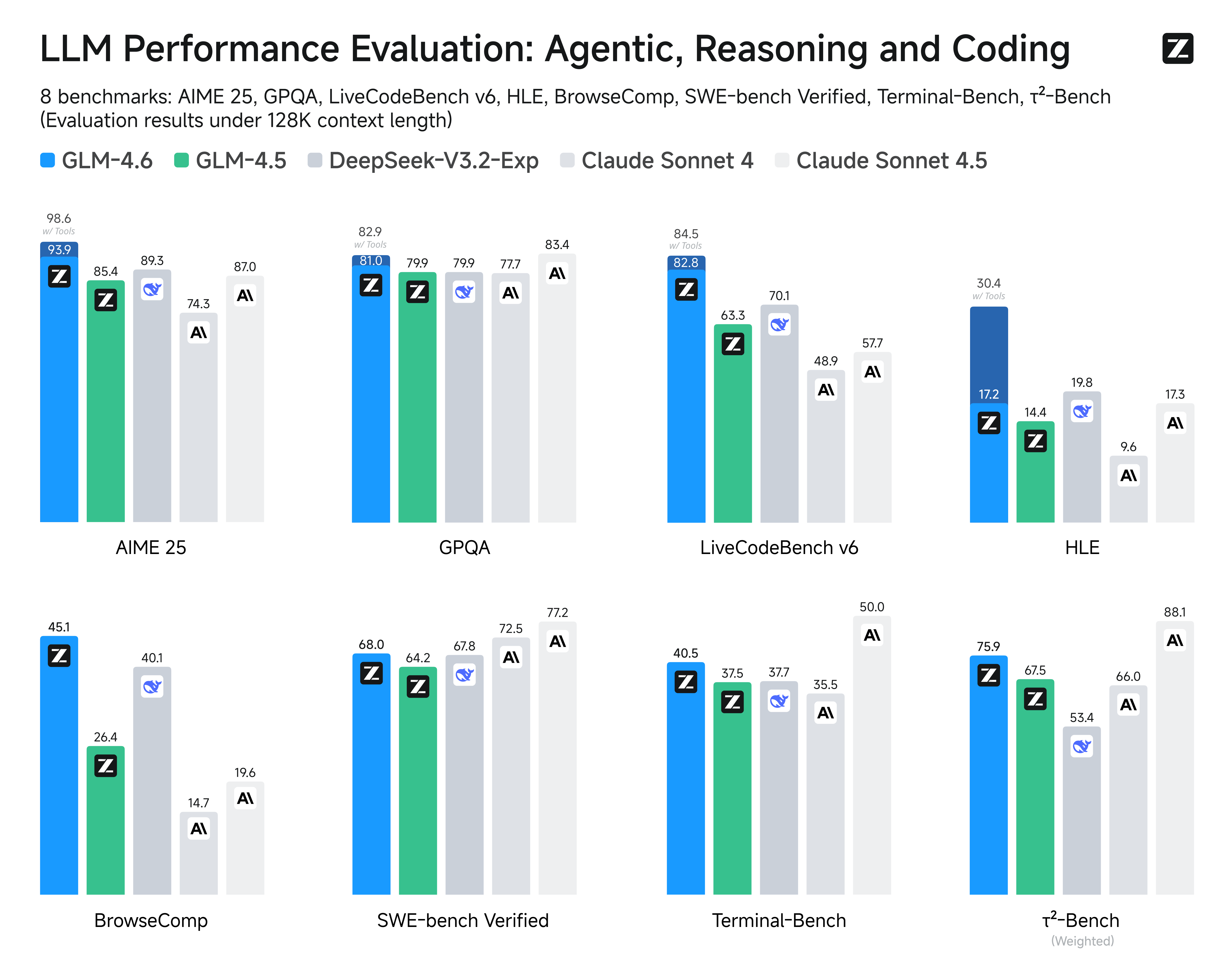
We evaluated GLM-4.6 across eight public benchmarks covering agents, reasoning, and coding. Results show clear gains over GLM-4.5, with GLM-4.6 also holding competitive advantages over leading domestic and international models such as DeepSeek-V3.1-Terminus and Claude Sonnet 4.
Inference
Both GLM-4.5 and GLM-4.6 use the same inference method.
you can check our github for more detail.
Recommended Evaluation Parameters
For general evaluations, we recommend using a sampling temperature of 1.0.
For code-related evaluation tasks (such as LCB), it is further recommended to set:
top_p = 0.95top_k = 40
Evaluation
- Downloads last month
- 4,489
1-bit
2-bit
3-bit
4-bit
5-bit
6-bit
8-bit
16-bit
Model tree for unsloth/GLM-4.6-GGUF
Base model
zai-org/GLM-4.6

# !pip install llama-cpp-python from llama_cpp import Llama llm = Llama.from_pretrained( repo_id="unsloth/GLM-4.6-GGUF", filename="", )